Disk Intelligence · Windows Native

SEE
WHERE
IT WENT.

Disk space analyzer for Windows

ClearSweep shows you exactly what's eating your disk — every folder, every file, laid out in an interactive 270° sunburst. Click to drill down. Hover for details. Drag to delete.

Windows 10 (19041+) · Windows 11 · GPU Accelerated
Scanning C:\
78%
Disk Used
▲ 23 GB recoverable
C:\ · 250 GB · 47,211 FILES
$9.99
One-time · No subscription
Download
01 — The Problem

STORAGE FULL.
AGAIN.

When storage fills up, you need to know which files and folders take up the most space. ClearSweep shows their sizes in a sunburst view so you can explore your drive before deciding what to remove.

Familiar frustrations
⚠
No visibility
You know space is gone. You don't know where. Windows gives you a pie chart with "Other."
⚠
Too many folders
Opening folders one at a time makes it hard to see which ones take up the most space.
⚠
Delete anxiety
You want to review a file before removing it, with time to cancel if you change your mind.
02 — How It Works

EVERY FILE.
ONE VIEW.

250 GB USED
Visualization
270° Sunburst View
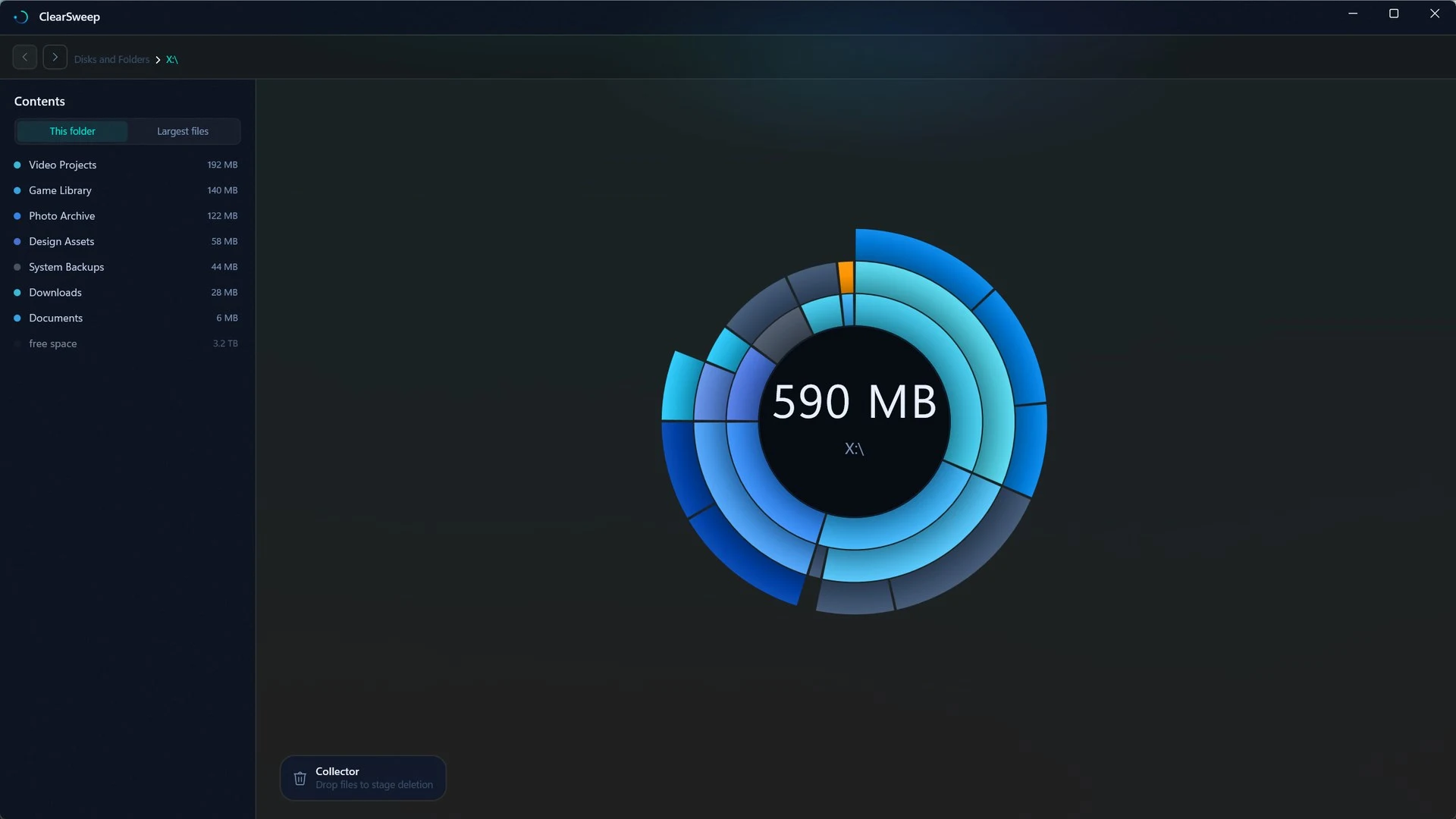
Your entire drive hierarchy at a glance. The bigger the slice, the more space it takes. Click any segment to drill down. Hover to see exact sizes and paths.
Rendering
GPU Accelerated
Win2D DirectX rendering. Explore folders with a GPU-rendered sunburst. Performance depends on your drive and hardware.
Design
Native Windows 11
Mica backdrop, Fluent Design geometry, dark mode that follows your system. Feels like it belongs — because it was built for Windows.
Safety
Safe Deletion
Review files in the collector before deleting them. You can cancel during the 5-second countdown. Files go to the Recycle Bin by default; permanent deletion is an opt-in setting.
4
sec
Cancel before deletion
ClearSweep showing an example drive with Video Projects, Game Library, and Photo Archive folders in a sunburst
ClearSweep's sunburst view. In this example, Video Projects uses 192 MB, the largest folder shown. Screenshot from our Microsoft Store listing. Select the image to view it full size.
03 — Safety

INTENTIONAL.
NOT RECKLESS.

01
Protected Folders
ClearSweep blocks deletion of protected Windows folders. Review each file before deleting it, even outside those folders.
02
5-Second Countdown
A 5-second countdown gives you time to cancel a deletion. Recycle Bin mode is the default. If you choose permanent deletion, removed files will not go to the Recycle Bin.
03
No Telemetry
Runs entirely offline. No analytics, no cloud sync, no usage data. Your file names, paths, and sizes never leave your machine. Ever.
04 · Compare

A VISUAL WAY TO
EXPLORE YOUR DRIVE.

ClearSweep is a Windows disk space analyzer with an interactive sunburst. Click a segment to explore a folder and see which files use the most storage.

Looking for DaisyDisk for Windows? ClearSweep is an independent alternative for Windows 10 and 11. See how ClearSweep compares to DaisyDisk.

Other options include WinDirStat for a treemap view and Filelight for concentric rings. Choose the view that helps you understand your files.

05 — Get It

RECLAIM
YOUR SPACE.

One-time purchase
$9.99
No subscription · No renewal · Yours forever
Download for Windows
Windows 10 (19041+) · Windows 11
What you get
  • 270° GPU-accelerated sunburst visualization
  • Instant drill-down on any folder or file
  • 5-second safe deletion with system protection
  • Native Mica / Fluent Design UI
  • Fully offline — zero telemetry
  • Updates through Microsoft Store
365 Buttons LLC · clearsweep.app